How websites check whether a username exists in just milliseconds
Ever noticed, when typing the username on any website it instantly tells you that the “username has already been taken”? How do apps verify the usernames availabilty at such an instant speed? What is the clever approach and data structure providing such important checks at such a great speed? The answer is Bloom Filters.
What is a Bloom Filter
Bloom Filter is a space-efficient probabilistic data structure that is used to determine the existence of an element in a set. It’s only job is to answer a single question, whether an element is present in a set or not?. The only trade-off being - bloom filters can be ‘wrong’. They can give false positives but never a false negatives, meaning it will never tell you something is absent when it is actually present, but it might occasionally claim something exists when it does not.
Why not search the usernames directly in the database
You might be thinking, when typing the username why not query the database on each press or for a more optimized system after a certain amount of timeout and verify whether the username is available or not. But at a large scale at which companies are operating currently it is nearly impossible to manage the traffic, cost and experience.
Just imagine your app has 100 million users, we need to check the availability of the usernames on each sign up
Assumptions:
- 100 million users
- Average username length ~ 12, i.e 12 bytes of space
- Hashing the usernames cost ~ 2x of overhead
Raw username storage:
100,000,000 × 12 bytes
= 1.2 GB

Hash set overhead (~2x):
1.2 GB × 2
= 2.4 GB
That’s 2.4 GB of RAM just to answer: “Does this username exist?”
If considering database load
- 100 million usernames
- 1 million signups per day
For every attempt
SELECT * FROM users WHERE user.username = 'abc'So:
1,000,000 username checks
=
1,000,000 database queries
Even if each query takes only 5 ms:
1,000,000 × 5 ms
=
5,000,000 ms
=
5,000 seconds
=
83 minutes of database work
And most of those usernames may not even exist.
Fundamental Structure and Algorithm
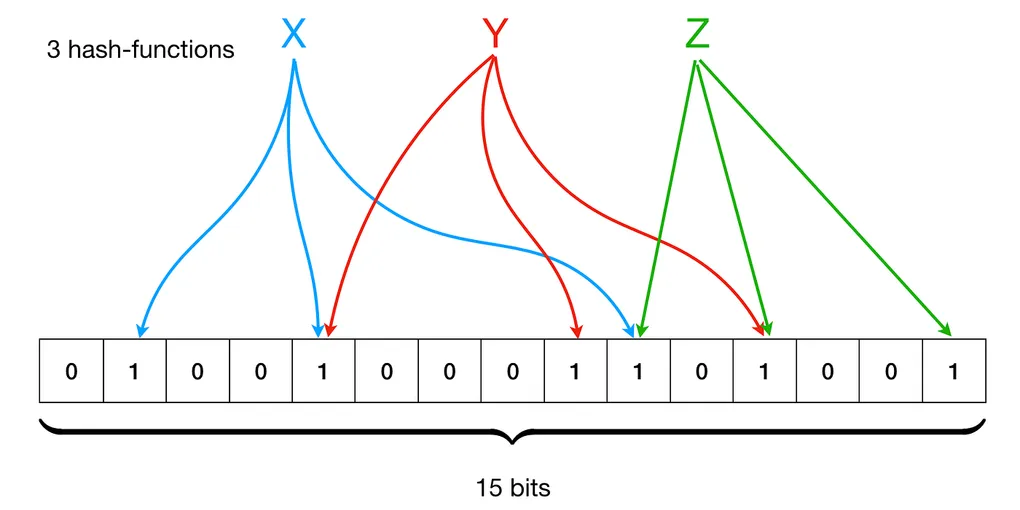
A Bloom Filter consists of two components: a m size bit array and a collection of k different hash functions, which map set elements to one of the possible m index in the array.
To add an element to the filter, feed the value to k hash functions to get k array positions. Set the bits at all these positions to 1.
add(element) {
    for i in 1 to k {
        position = hash_i(element) % m // m is the size of the array
        bit_array[position] = 1
    }
}
The algorithm says, when checking for the specific element, feed the element to the hash functions, get the index positions, if any of the bits at these positions is 0, the element is definitely not in the set, else the element is probably present
To check the existence of an element:
check(element) {
    for i in 1 to k {
      position = hash_i(element) % m
        if bit_array[position] == 0 {
          return false
        }
    }
    return true
}
The solution of not querying the database is to use Bloom filters instead. Companies take the existing usernames and adds them to the Bloom filter. When you type your username it is fed to the hash functions to get the certain index positions. If the bits at these positions are 0 then the username is definitely not present, and if it’s 1 then it might be present, after this we query the actual database and save our time and compute.
Here’s a concrete example: A company has the following existing usernames
- john
- alex
We create a Bloom filter with 10 bit array size and 2 hash functions
Add the username to the Bloom filter
Insert john
hash1("john") mod 10 = 2
hash2("john") mod 10 = 5
It set bits 2 and 5
[0 0 1 0 0 1 0 0 0 0]Insert alex
hash1("alex") mod 10 = 3
hash2("alex") mod 10 = 7
It set bits 3 and 7
[0 0 1 1 0 1 0 1 0 0]Now you try signing up with a username: jacob
It first checks the Bloom filter
hash1("jacob") mod 10 = 1
hash2("jacob") mod 10 = 6

// bit array [0 0 1 1 0 1 0 1 0 0]
The bits at position 1 and 6 are 0, therefore we know that the username is definitely not present.
Let’s take one more case, where another user tries signing up with a username: bob
hash1("bob") mod 10 = 2
hash2("bob") mod 10 = 3

// bit array [0 0 1 1 0 1 0 1 0 0]
We can clearly see that the position 2 and 3 are 1, the bloom filter says that the username “bob” might be present in the database.
But here’s the catch, “bob” was never inserted, these bits are 1 as a side-effect of inserting “John” and “Alex”. This is a false positive.
Removing an element from a Bloom filter
Removing an element from this simple Bloom filter is impossible, because there is no way to tell which of the k bits it maps to should be cleared. Setting any of the k bits to 0 is not the right choice as it can be a side-effect of some other element. As this simple Bloom filter algorithm doesn’t provide a way to determine which element affect the bits, setting the k bits to 0 may introduce the possibility of false negatives.
Conclusion
Bloom Filter is space-efficient probabilistic data structure invented by Burton Howard Bloom in 1970. The core problem it solves is “whether an element is present in a set or not”. It either answers that the element is “definitely not present” or “probably present”.
Bloom filters are heavily used in production systems even today
- Google Bigtable, Apache HBase, Apache Cassandra, ScyllaDB and PostgreSQL use Bloom filters to reduce the disk lookups for non-existent rows or columns.
- Medium uses Bloom filters to avoid recommending articles a user has previously read.
- Ethereum uses Bloom filters for quickly finding logs on the Ethereum blockchain.